One place to monitor
Your resources.
Your agent accounts.
See Spark hosts, Kubernetes clusters, and Claude or Codex accounts together. Choose what to watch and open its recent history.
Sign in to open your dashboard and manage API tokens. No API token is needed to browse your own data on Web. You can also use an email address.
Character preview · sample data
HOW VIBEMON WORKS
From your tools to every screen.
Resources and agents report to VibeMon. Your apps show the same workspace. Pro adds iPhone alerts.
AT A GLANCE
Keep the essentials in sight.
Check an agent’s activity or a server’s health without opening the dashboard. Give each account or resource its own widget.
Add widgets to your Mac desktop, iPhone Home or Lock Screen, or Android Home screen.
Refresh timing depends on the operating system. Mac widgets need VibeMon Desktop running in the background.
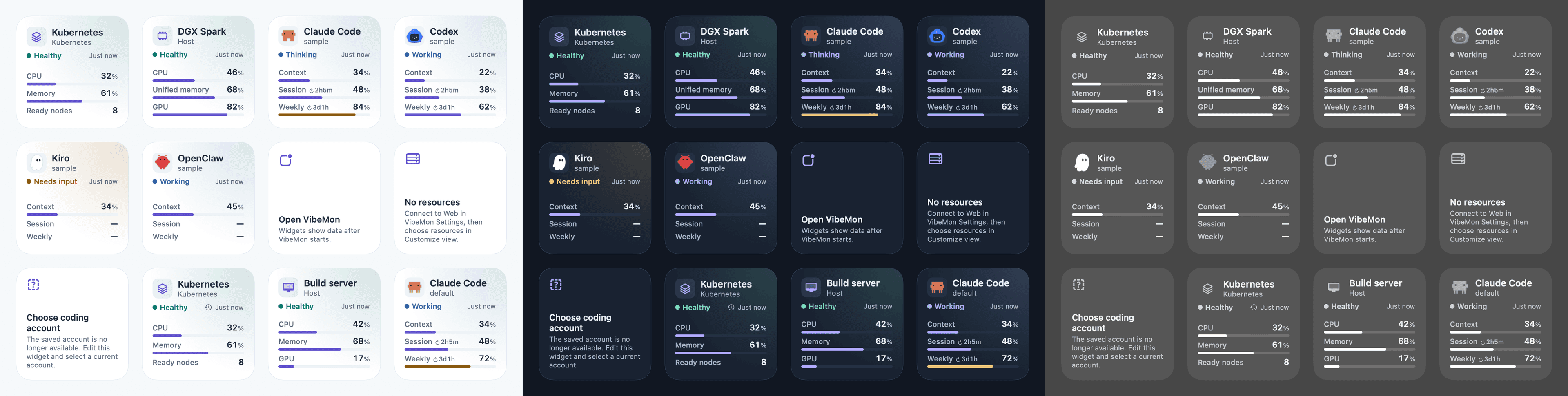
Samples: Claude Code · Codex
VibeMon Pro
Your workspace is free. Add alerts with Pro.
Follow your agents and resources across devices. Pro adds iPhone alerts and 7-day and 30-day history on supported mobile apps.
1. Sign in
Choose a sign-in method to access your dashboard and keep your data separate.
2. Connect sources
Run the installer on each computer or server and approve its sign-in code. Provider credentials stay on their own machines.
3. Choose your view
Select resources, accounts, and metrics. In the Desktop App, select "Sign in with VibeMon" to see the same view.
Install VibeMon
Pick your device. Each App shows the same workspace as this site.
Install with Homebrew
brew install opspresso/tap/vibemonFor Macs with Apple silicon. VibeMon checks for updates itself.
- Paste the command in Terminal and press Return.
- Open VibeMon from Applications. Its icon appears in the menu bar.
- Select the icon, then Dashboard. In Settings → Connections, select Sign in with VibeMon.
No Homebrew? Download the .dmg installerRead the full setup guide
Download the installer
Download for WindowsFor 64-bit Windows. The button opens the latest release on GitHub.
- Under Assets, download VibeMon-Setup-<version>.exe.
- Run it. If Windows warns about an unknown publisher, select More info, then Run anyway.
- Open VibeMon from the system tray and select Dashboard. In Settings → Connections, select Sign in with VibeMon.
Get it on the App Store
Free on the App Store. Requires iOS 18 or later.
- Install VibeMon from the App Store.
- Open it and select Sign in to VibeMon. Use the same account as on this site.
- Add the VibeMon widget to the Home Screen or the Lock Screen.
Download the APK
Download for AndroidFor Android 8.0 or later. The button opens the latest release on GitHub.
- Under Assets, download VibeMon-<version>.apk.
- Open the file. When Android asks, allow your browser or file app to install apps, then select Install.
- Open VibeMon and select Sign in to VibeMon. Use the same account as on this site.